Monday, April 30, 2018

SQL SERVER – How to Get SQL Server Agent Properties?

During Comprehensive Database Performance Health Check we always go over various SQL Server properties. Lots of people do not know that there are quite a few SQL Server settings which can help us improve our SQL Server performance many folds. While I was discussing SQL Server properties, someone asked me if there are similar settings for SQL Server Agent available which users can tune.

This is indeed a very interesting question as there are lots of SQL Server Agent properties but not many people are aware of the same. There are two different ways to check various properties of SQL Server Agent.

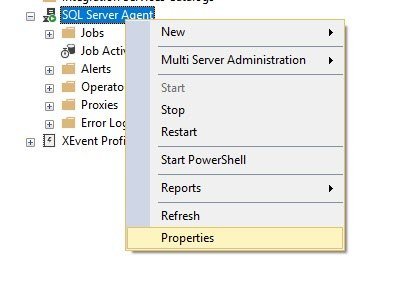
Method 1: Right click on SQL Server Agent node and explore various properties.

SQL SERVER - How to Get SQL Server Agent Properties? agentprop

Method 2: With T-SQL


EXEC msdb.dbo.sp_get_sqlagent_properties

Here is the T-SQL command which you can run on SQL Server Management Studio new query windows to get all the properties of Agent.

Please note if your Agent is turned off or the services are not installed, you will get empty resultset for this query.

Let me know if you have ever changed any of the SQL Server Agent’s properties and if the answer is yes, I would like to know what was the business reason behind it.

Reference: Pinal Dave (https://blog.sqlauthority.com)

First appeared on SQL SERVER – How to Get SQL Server Agent Properties?


from SQL Authority with Pinal Dave https://ift.tt/2FuBJep

Security baseline for Windows 10 “April 2018 Update” (v1803) – FINAL

Microsoft is pleased to announce the final release of the security configuration baseline settings for Windows 10 “April 2018 Update,” also known as version 1803, “Redstone 4,” or RS4.

Download the content here: Windows-10-RS4-Security-Baseline-FINAL

The downloadable attachment to this blog post (which will be incorporated into the Security Compliance Toolkit shortly) includes importable GPOs, scripts for applying the GPOs to local policy, custom ADMX files for Group Policy settings, all the recommended settings in spreadsheet form and as a Policy Analyzer file (MSFT-Win10-v1803-RS4-FINAL.PolicyRules), and a Policy Analyzer-generated spreadsheet showing the differences from the RS3/v1709 baseline.

The only change from the draft version of this baseline is that after discussion we have removed the recommendation to configure the “Microsoft network server: Amount of idle time required before suspending session” security option. Enforcing that setting does not mitigate a contemporary security threat.

The differences between this baseline package and that for Windows 10 v1709 (a.k.a., “Fall Creators Update,” “Redstone 3”, RS3) include:

  • Two scripts to apply settings to local policy: one for domain-joined systems and a separate one that removes the prohibitions on remote access for local accounts, which is particularly helpful for non-domain-joined systems, and for remote administration using LAPS-managed accounts.
  • Increased alignment with the Advanced Auditing recommendations in the Windows 10 and Windows Server 2016 security auditing and monitoring reference document (also reflected here).
  • Updated Windows Defender Exploit Guard Exploit Protection settings (separate EP.xml file).
  • New Windows Defender Exploit Guard Attack Surface Reduction (ASR) mitigations.
  • Removed numerous settings that were determined no longer to provide mitigations against contemporary security threats. The GPO differences are listed in the “Delta RS3 to RS4 baseline.xlsx” spreadsheet in the package’s Documentation folder. (Since the draft release of the RS4 baseline, we removed one more setting: “Microsoft network server: Amount of idle time required before suspending session.”)

After the draft baseline was released, Windows added another GPO setting that we considered adding to the baseline but ultimately decided not to configure at this time. The GPO path is Computer ConfigurationAdministrative TemplatesSystemCredentials DelegationEncryption Oracle Remediation. You can read information about the setting here and here. (Note that the term “Oracle” here refers to a cryptographic concept and not to anything having to do with Oracle Corporation or its products.) While we recommend patching systems and incorporating this setting as soon as possible, we opted not to include it in the baseline for broad use in the short term because if all servers and clients aren’t patched in a timely fashion the setting will block remote desktop connections. We anticipate incorporating this setting in the next baseline that we publish.

When we published the draft baseline for RS4, we requested feedback about replacing the firewall’s logging facility with Advanced Auditing, such as by auditing failure events for Filtering Platform Connection. At this time, we’re going to keep the baseline as it is rather than introduce more changes. But remember that the baseline is just that: a starting point. If monitoring security events works better for you than monitoring firewall logs, do so. Or if you want to use both, do so.

Windows 10 v1803 (RS4) has greatly expanded its manageability using Mobile Device Management (MDM). However, our mapping from the baseline’s GPO settings to MDM is not ready to publish at this time. We will publish the baseline in MDM form as soon as it is ready.


from TechNet Blogs https://ift.tt/2ra5Q6f

Tip of the Day: What’s new in the Windows 10 April 2018 Update

Today's tip...

Next, hot of the press!

Reference: “What’s new in the Windows 10 April 2018 Update” - https://blogs.windows.com/windowsexperience/2018/04/30/whats-new-in-the-windows-10-april-2018-update/#Dsgvd1lRj0zhaLxv.97


from TechNet Blogs https://ift.tt/2rbEP1I

Integrated Security Configuration for your Azure VM

Last week I wrote about the new Azure Security Center Network Map, today I want to talk about the new integrated security configuration experience for Azure VMs, which was also something that we announced at RSA Conference. With this new experience, you can see all recommendations for a particular VM, directly from the VM's properties in the Azure Portal, under the Security settings as shown below:

With this new integration, you can quickly visualize VM's recommendations as you go through the process of reviewing the VM's settings. In this blade you can also identify in which workspace this VM is located, and the Security Center tier. This interface also allows you to quickly navigate from this blade to Security Center dashboard.

Can I export these recommendations?

Since this is a common question, I decided to add it here, and the answer is: you can, but not from this blade. The best way to export Azure Security Center recommendations is via Azure Advisor dashboard. As you can see below, the Security tile is basically a list of recommendations coming from Azure Security Center:

From this dashboard, you can download the recommendations as PDF or CSV format.


from TechNet Blogs https://ift.tt/2jhWm4E

Support-Info: (GROUP MANAGEMENT): Group information is not being synchronized to/from Active Directory

PRODUCTS / SOLUTIONS / FEATURES INVOLVED

  • Microsoft Identity Manager 2016 Service Pack 1
    • Group Management

PROBLEM SCENARIO DESCRIPTION

  • This issue centered around Group Management.  We were not seeing Security and/or Distribution Groups be synchronized correctly through the Synchronization Engine.

CAUSE

From Portal to Active Directory

  • We noticed that the Provisioning Synchronization Rules for Security Groups were not being applied.
  • In review of the Outbound Synchronization Rule, the Scope was set to "GroupType" instead of "Type"

From Active Directory to Portal

  • FIM Service Management Agent was missing Export Attribute Flow (EAF) for member

RESOLUTION - FROM PORTAL TO ACTIVE DIRECTORY

  1. Update the Scope on the Group Outbound Synchronization Rule
    1. Set the Scope to reference the Metaverse Attribute "Type"
    2. Updated the DN on the Outbound Attribute Flow tab to ensure that it referenced an OU that exists in Active Directory and is in Scope for the Active Directory Management Agent.
  2. Import and Sync the update to the Synchronization Rule into the Synchronization Service Engine (FIM Service Management Agent Connector Space and Metaverse)
  3. Test the Synchronization Process through the use of the Preview Feature

RESOLUTION - FROM ACTIVE DIRECTORY TO PORTAL

  1. Added Export Attribute Flow for the attribute Member on the Group to Group branch under Configure Attribute Flow

ADDITIONAL INFORMATION


from TechNet Blogs https://ift.tt/2JDPYjd

Support-Info: (PCNS): PCNS is not sending passwords to the Synchronization Service Engine


PRODUCTS / COMPONENTS INVOLVED

  • Microsoft Identity Manager 2016 Service Pack 1
    • Password Change Notification Service (PCNS)

PROBLEM SCENARIO DESCRIPTION

  • Passwords are not being replicated to the Target Domain

NOTE

If passwords are not making it from the Source Domain Controller to the Synchronization Service Manager GUI, enable verbose logging and see if you are getting an Event ID 6025 in the Application Event Log.

PCNS: Troubleshooting Event ID 6025: https://social.technet.microsoft.com/wiki/contents/articles/4159.pcns-troubleshooting-event-id-6025.aspx

CAUSE

  • Password Synchronization was not enabled in the Synchronization Service Manager GUI
    • Enable Password Synchronization  in Tools > Options was not enabled (checked)
  • Source and Target Management Agents were not setup

Source - Configure Directory Partitions

  • Target - Configure Extensions

RESOLUTION

  • Enable the Enable Password Synchronization option in Tools > Options
  • Enable the Source Management Agent on Configure Directory Partitions
  • Enable the Target Management Agent on Configure Extensions

  ADDITIONAL INFORMATION


from TechNet Blogs https://ift.tt/2r9Buke

Tip of the Day: How to get the Windows 10 April 2018 Update

Today's tip...

Hot off the press. Here’s today’s latest blog!

 Reference: John Cable’s Blog Post - “How to get the Windows 10 April 2018 Update” - https://blogs.windows.com/windowsexperience/2018/04/30/how-to-get-the-windows-10-april-2018-update/


from TechNet Blogs https://ift.tt/2HZD8P9

The May Partner Insider call is this Wednesday!

Todd Sweetser

The May Partner Insider call is this Wednesday!

Join the Microsoft US team for the Partner Insider call this Wednesday, May 2, 2018 where you’ll get valuable, actionable information to help your Microsoft business grow.

May Agenda:

  • Insider Scoop | Melody Chen, Partner Channel Marketing Manager will cover events, training, offers in market and more
  • Office 365 Business Apps | Jimmy Ward, Senior Product Marketing Manager will walk you through the Business apps for SMBs, give a demo and talk about the partner opportunity
  • Solution Areas Plays | Jose Gomez Cueto Director, One Commercial Partner, Go to Market, will share new resources to help your customers achieve digital transformation

STAY IN THE KNOW

We look forward to you joining us on the May 2 Partner Insider call!


from TechNet Blogs https://ift.tt/2vYLDFp

Tip of the Day: Windows 10 April 2018 Update

Today's tip...

Time for the official announcements to start rolling out. Here was the first!

New features in Windows 10 April 2018 Update to save you time:

  • Timeline
  • Focus Assist
  • Updates to Edge
  • Dictation

Reference: “Make the most of your time with the new Windows 10 update” - https://blogs.windows.com/windowsexperience/2018/04/27/make-the-most-of-your-time-with-the-new-windows-10-update/#DCcjCJXskRzFYgfb.97


from TechNet Blogs https://ift.tt/2HI4Z3c

Tip of the Day: Features Removed or Planned for Replacement starting with Windows 10, version 1803

Today's tip...

Each release of Windows 10 adds new features and functionality; we also occasionally remove features and functionality, usually because we've added a better option. Here are the details about the features and functionalities that we removed in Windows 10, version 1803 (also called Windows 10 April 2018 Update).

Reference: “Features removed or planned for replacement starting with Windows 10, version 1803” - https://docs.microsoft.com/en-us/windows/deployment/planning/windows-10-1803-removed-features


from TechNet Blogs https://ift.tt/2jjJUS5

Tip of the Day: Help me choose

Today's tip...

Here’s a great tool that anyone can use to:

  • Shop for a new Windows 10 PC - Let’s you pick you devices based on what you plan to use it for and any special features you want to use.
  • Get Windows 10 – Let’s you pick between Home, School/Education, and Business versions. Also recommends new devices if yours is getting up there in age.
  • Check for Windows 10 updates – Quickly lets you know if you are up to date or if you need a bit of patching.
  • Learn more about Windows 10 Features – Currently showing you all of the cool features in the Windows 10 April 2018 Update.

Check it out and forward this along to your friends and family!

Reference: “Help me choose” - https://www.microsoft.com/en-us/windows/get-windows-10


from TechNet Blogs https://ift.tt/2HI50UO

Phishing Examples for the Microsoft Office 365 Attack Simulator – Part One

Why would you want to simulate a phishing attack on your own organization?

Email hygiene filters work wonders, effectively identifying and blocking a substantial portion of email sent across the global Internet as SPAM or containing malicious content. Even with such a high rate of filtering success, as in life nothing is perfect, and this is a constantly evolving cyber-battle, so there is always a chance some unwanted email will get past even the best hygiene scanners. The attackers are business people and they are smart - very smart. Microsoft and other security companies track millions of attacks each year and analyze each one for intelligence gathering and mitigation efforts. It is this very rich data that enables us to provide some of the best security defenses in the world (see more here). But with attack vectors constantly changing, what is often the last line of defense is people - your organization's users. They must be trained and constantly re-trained to identify legitimate emails from those phishing emails are malicious and well-crafted.

In March 2018, Microsoft released its latest toolset to assist you in efforts to train your users on the identification and dangers of phishing emails. Now part of some Office 365 plans, the Office 365 Attack Simulator does exactly what the name implies, including email spear phishing simulations, brute force password attacks, and password spray attacks. There is plenty of information available on this product already, but for this blog series I am focusing on how to write your phishing simulation emails for this tool. I also have written over ten examples you can use and modify if needed. Read below for more information on how to plan your simulated phishing attack in the Office 365 Attack Simulator. Good hunting!

What you need to get started:

Leadership Approval: Before launching a spear phishing attack (even a simulated one) on your own users, it is best to obtain approval from your organization's leadership team. In your request, explain why this simulation is so important. Explain that even with the best security detection and defenses in place, roughly 75% of all company breaches now start with phishing attempts designed to steal user credentials. Once stolen, an attacker will then use this open door to start walking through the network (often undetected for months) looking for the newest form of currency - your organization's data. Most importantly though, highlight this is a benign simulation that will not cause harm to your users. Rather, the simulation is to track just how susceptible your organization is to malicious emails. The results will enable you to move forward with next steps to train your users.

You may want to limit the people you speak to about this simulation because you want this to be as real as possible, potentially catching them off guard.

Technical Requirements: There are several technical requirements needed to prepare the simulation. These are already defined in this link under the "Before You Begin… section," so there is no need to republish them here.

Simulated Phishing Email Examples:

Now that you know why a phishing simulation can be so effective and what you need to get started, how do you design your simulation emails? How do you trick your users into believing these are real emails and to take the requested action? Often, all that is needed to initiate an infection or credential theft is just a click on a hyperlink - the goal of many phishing attacks. So, we'll focus on the design of our phishing emails with this in mind.

The new Office 365 Attack Simulator tool has several phishing simulation email templates to choose from when designing your self-imposed attack. To provide you with additional phishing simulation examples, I created several more that you may also choose to use as they are written or that you may modify for your own environment. Since blogs are not meant to be novels, I have created several blogs to host a list of these examples. Each of the blogs below contains about five phishing templates.

Phishing Examples for the Microsoft Office 365 Attack Simulator - Part One (Background) current page

Phishing Examples for the Microsoft Office 365 Attack Simulator - Part Two (Simulations 1-5)

Phishing Examples for the Microsoft Office 365 Attack Simulator - Part Three (Simulations 6-10)

Consider using multiple phishing emails as part of your simulation. Using the same simulated phishing email is more likely get noticed by users and recognized as fake. Remember, the attackers are smart business people and most likely not going to use the same phishing emails either. Rather, they will use a combination of many phishing emails sent over a period of days or weeks to your organization. You should consider doing the same.

In each of the phishing simulated emails, be sure to include several of these items that are often used in phishing attacks:

  • Give the reader a reason to take immediate action. What will they gain with the action taken? Or, what do they run the risk of losing without action?
  • Keep the emails short. Just a few sentences within just a few paragraphs.
  • Make the email "from name" and "from email address" be something noticeable in your organization
  • Make sure the email resolves to an internal account so it appears as an account name and not an external email address with an @ in it.
  • Use the same terminology in the email simulation that is used internally. For example, what is your IT/Technical department known as? Use the same department name in the simulated phishing emails. Or, what is your company social committee called? What is your HR Department known as?
  • Use program names, contest names, registration request titles, etc. as names within the emails. Then, insert a hyperlink to one of the Office 365 Attack Simulator sites to track the clicks.
  • If you are adding some pictures or design to your email, make sure it fits within the 'look' of your organization. What is the typical look of a broadcast email sent around internally - use that to make it even more real!
  • Include multiple phishing emails as part of each simulation.
  • Always test the simulation first on a few test accounts. Make sure the system is recording the hyperlink clicks of each test user correctly.

With your simulated phishing emails now written, how do you use them in the Office 365 Attack Simulator?

If not already familiar with the steps to access the Office 365 Attack Simulator, there are plenty of articles and videos available already, so I don't need to rehash the steps here. Below are a few great links to get you started.

For an overview and quick walk through of the Office 365 Attack Simulator, see this six-minute Microsoft Mechanics video:

Introducing Office 365 Attack Simulator

This TechNet blog provides instructions about how to launch a simulated attack:

Secure Your Office 365 Tenant - by Attacking It

Recommendations on next steps:

The goal of the simulated phishing attack is to first record how many of your users will click on what could otherwise be a malicious hyperlink. And second, to help educate them on how to quickly identify fake phishing emails. Additionally, you want to report on the initial user click rate and then click rates after a user awareness program has been implemented - hopefully, you will see an improvement because of your efforts!

The initial and follow up recorded hyperlink clicks by your employees need to be tracked and reported to your organization's leadership team. Security is not just a concern for the technical team, but rather for the leadership team of every organization. Let the leadership team know just how bad the problem is and ask the question, "What if this were a real phishing attack? What could have been the impact of a significant data breach from our organization?" Then remind them that the best security posture is to always assume a breach has already occurred - you just haven't found it yet. The Office 365 Attack Simulator will enable you to report how many users clicked on the phishing emails and who.

One you have completed your simulated phishing attacks, determine your plan of action to educate your users. Consider letting the entire organization know about the simulated phishing attack and perhaps the concerning results. Then, provide several resources that will inform your users how to quickly identify phishing emails. Consider hosting an internal SharePoint site with articles or videos to learn more about the topic. Consider creating some mandatory training. Below is a great article from Microsoft about how to identify key characteristics of a phishing email:

Protect Yourself from Phishing

Just as important as identifying a phishing email, is how to report it. Microsoft has created a no charge SPAM/Phishing/Junk reporting add-in to Outlook that takes minutes to install on a single machine or to deploy to all Outlook users in an Office 365 tenant. I published a blog several weeks ago about this fantastic new plug-in. This is the link:

Enable Users to Easily Submit Junk, Phishing, and SPAM Messages in Outlook

To further secure user credentials in your organization, consider enabling Multi-Factor Authentication (MFA). MFA is available to all Office 365 users, no matter the subscription level. Notice in this blog how concerned we are with users being tricked by a phishing email designed to steal their credentials - a username and password. With MFA enabled, you will have created very powerful new line of defense (that we highly recommend). If a username and password is stolen, with MFA enabled there is little chance an attacker can move any further into your network. For more information on MFA, see the links below:

Multi-Factor Authentication for Office 365 (video)

Set up Multi-Factor Authentication for Office 365 Users

Summary:

The new Office 365 Attack Simulator is an excellent product to have in your toolbox to help further secure your environment. With users being the last line of defense in this ever-evolving cyber battle where credentials and data is the new currency of criminals, user education is now more important than ever in the identification of fake emails.

Please make periodic use of the Office 365 Attack Simulator and use the examples to make the simulations even more realistic. Happy hunting!


from TechNet Blogs https://ift.tt/2KoJg1W

Phishing Examples for the Microsoft Office 365 Attack Simulator – Part Two

Examples of Phishing Emails for the Microsoft Office 365 Attack Simulator - Part Two

This is the second post of a multi-part blog with examples to use as part of a phishing simulation in the new Microsoft Office 365 Attack Simulator. For background information on the tool and this blog series, click on Part One below.

Phishing Examples for the Microsoft Office 365 Attack Simulator - Part One (Background)

Phishing Examples for the Microsoft Office 365 Attack Simulator - Part Two (Simulations 1-5) current page

Phishing Examples for the Microsoft Office 365 Attack Simulator - Part Three (Simulations 6-10)

Simulation 1: Employee Feedback Program

From Name: Employee Peer Feedback Program

From Email Address: EmployeePeerFeedbackProgram@companydomain.com

Phishing Logon Server URL: (choose the most appropriate option)

Email Subject: New Employee Peer Feedback Program - Action Needed

When/How to Use This Template: This template is best used just prior to your organization's review timeframe. If sent several weeks prior to the review period, it will be that much more relevant to your employees. Insert a hyperlink into the space provided below for successful click tracking.

Email Body:

Hello ${username},

Welcome to the new Employee Peer Feedback System (ERS). As part of the new corporate peer evaluation system, you now have the opportunity to request feedback from coworkers about your job performance over the past evaluation period. This feedback is a critical part of your overall evaluation that will be used by your manager.

Please click on the link below to get started. You will be guided through this simple to use feedback system to request feedback from coworkers as well as provide feedback for your coworkers who have requested it from you.

The feedback window is only open for the next two weeks, so please take action now.

Employee Peer Feedback System website (insert hyperlink here)

Thank you.

Simulation 2: First Annual Company Retreat

From Name: First Annual Company Retreat Registration

From Email Address: AnnualCompanyRetreatRegistration

Phishing Logon Server URL: (choose the most appropriate option)

Email Subject: Registration for the First Annual Company Summer Retreat

When/How to Use This Template: Use this phishing template in the Spring or Summer at the time when many people are looking forward to getting away from it all after a long Winter. Insert a hyperlink into the space provided below for successful click tracking.

Email Body:

Hello ${username},

This is the first of many emails you will receive about the first annual company retreat. This is an opportunity for you and your significant other to enjoy a bit of time away. At this three-day event we will enjoy great entertainment, have plenty of time to relax, put work aside and rejuvenate. Yes, there will be one or two work oriented seminars but these will be fun and unforgettable.

To find out more details, we are requesting each employee to review the link below for more details, let us know if you will be able to attend, and provide registration information. This will be an event you will not want to miss! We are looking forward to seeing everyone there.

Company Retreat Official Site (insert tracking link here)

Thank you!

Simulation 3: Unusual Account Logon Activity Identified

From Name: Corporate Security Team

From Email Address: SecurityTeam@companydomain.com

Phishing Logon Server URL: (choose the most appropriate option)

Email Subject: Unusual Account Logon Activity

When/How to Use This Template: This is a phishing template to use anytime as it is always relevant. Insert a hyperlink into the space provided below for successful click tracking.

Email Body:

Hello ${username},

As part of an ongoing evaluation of our network security, we recently implemented a program to monitor for suspicious network logon activity. Your account was found to have logged in to your US office location yesterday and within a few hours found also to have logged in from an area of Australia. This is an impossible logon event and we are requesting your immediate assistance to help identify any additional suspicious activity with your account.

Can you please take a few minutes to log into the company portal below and review additional logon activity as well as recent data that has been accessed by your account.

Company Cloud Logon Portal (insert link to tracking site here)

Thank you for your help.

Simulation 4: Company Sponsored MLB Baseball Game

From Name: Company Recreation Committee

From Email Address: CompanyRecreationCommittee@companydomain.com

Phishing Logon Server URL: (choose the most appropriate option)

Email Subject: Your Invitation to a (Local City Baseball Team) Company Sponsored Baseball Game

When/How to Use This Template: Use this phishing template in the early Spring time such as the March or April timeframe as the sports season is just beginning. A similar email can be used to target any major sports team. Insert a hyperlink into the space provided below for successful click tracking.

Email Body:

Hello ${username},

The new company sponsored recreational committee has been working hard to develop one of our first company events. This event will be held on (date) at the (City/Baseball Team Name) in downtown (name of city). This event is being offered to you at no cost. Included are tickets for you and your family to the baseball park, parking vouchers, $20 in spending money for each person for food and beverages - all for an afternoon of fun, relaxation and a chance to cheer on our team!

The recreational committee needs an accurate count of how many tickets to purchase to the stadium. If interested (and we hope that you are!), please logon to the company site below to register and provide us with the tickets needed for you and your immediate family. We are looking forward to seeing everyone at this fantastic event!

Company Recreation Committee MLB Baseball Signup Site (insert link here)

Thank you!

Simulation 5: Company Apparel Orders

From Name: Company Apparel

From Email Address: CompanyApparelOrders@companydomain.com

Phishing Logon Server URL: (choose the most appropriate option)

Email Subject: Company Apparel Orders

When/How to Use This Template: This phishing template may be used anytime. Insert a hyperlink into the space provided below for successful click tracking on the company apparel website.

Email Body:

Hello ${username},

The marketing team has recently completed a revamp of apparel options featuring our company logo. We removed our previous supplier after hearing about quality concerns and worked with one of the leading and hottest apparel manufacturers today. In addition to these new apparel options, we have revamped the entire line of products with company logos on them such as hats, pens, pencils, paper pads, binders, etc.

Please take a moment to review the entire line up of new products on our vendors site using the link below. This is your opportunity to show your support for our company!

(Insert Company Apparel link here)

Thank you


from TechNet Blogs https://ift.tt/2FsuS59

Phishing Examples for the Microsoft Office 365 Attack Simulator – Part Three

This is the third post of a multi-part blog with examples to use as part of a phishing simulation in the new Microsoft Office 365 Attack Simulator tool. For background information on the tool and this blog series, click on Part One below.

Phishing Examples for the Microsoft Office 365 Attack Simulator - Part One (Background)

Phishing Examples for the Microsoft Office 365 Attack Simulator - Part Two (Simulations 1-5)

Phishing Examples for the Microsoft Office 365 Attack Simulator - Part Three (Simulations 6-10) current page

Simulation 6: Holiday Pumpkin Pies from the Company Social Committee

From Name: Your Company Social Committee

From Email Address: CompanySocialCommittee@companydomain.com

Phishing Logon Server URL: (choose the most appropriate option)

Email Subject: Social Committee Pumpkin Pies - Our Holiday Gift for Your Family

When/How to Use This Template: This is a great phishing simulation to run just before the holidays. Specifically, a few weeks before the United States Thanksgiving holiday. If your company already has a social committee, be sure to use the same sender name and email address they may already use. Insert a hyperlink into the space provided below for successful click tracking for the registration of holiday pies.

Email Body:

Hello ${username},

Your company social committee would like you and your family to enjoy the holidays with a gift on us! We are offering a free pumpkin or apple pie that you can enjoy at your holiday dinner table. This is our gift (sponsored by the company) to you as a thank you for all your hard work each and every day. And our hope is that this small gift of appreciation will help make your holidays a bit more relaxing (and tasty!).

We want to make receiving this gift as easy as possible. To make sure we order the appropriate amount of pumpkin and apple pies, we need each employee to register at the link below by next Friday, (insert date) indicating which pie they would like to receive. There is a limit of one pie per full time employee. Pies will be distributed from the office lobby between 2-5pm on the Friday before Thanksgiving.

Register for your holiday pie here (insert link here).

Thank you again for all that you do!

Your Social Committee

Simulation 7: Migration of Email Services Complete - Test New Web Client

From Name: Technical Service Department

From Email Address: ITServices@companydomain.com

Phishing Logon Server URL: (choose the most appropriate option)

Email Subject: Migration of Email Services Complete - Test New Web Client

When/How to Use This Template: Use this template anytime, but especially around the time of an email migration that your users may be aware of. Insert a hyperlink into the space provided below for successful survey link click tracking.

Email Body:

Hello ${username},

On behalf of your computer network team, in invite you to explore the new features of our new web-based email client. Our department has been hard at work for the past several months to evaluate your needs, design the most appropriate solution, implement, and now pilot it. You all now have access to this new email web client by accessing it from this site: (site link).

In the new client you will find an enhanced interface making it easier to schedule meetings, submit junk mail to help improve our SPAM filters, read/respond to email, use the new spell checking options, edit the layout of the new interface to your preference, and best of all - you can do this from anywhere with an Internet connection! We are empowering you to be more productive with your most critical communication tool.

To make sure we have hit the mark on this new tool and/or to hear your suggestions for further improvements, please be sure to provide feedback at this link as well: (survey/feedback link).

Thank you for your time and please enjoy this great new interface to help all of us easily access our email from anywhere.

Your Network Department Leadership Team

Simulation 8: Email Account Almost Full

From Name: Network Team

From Email Address: NetworkTeam@domain.com

Phishing Logon Server URL: (choose the most appropriate option)

Email Subject: Your Email Account is Almost Full

When/How to Use This Template: Use this phishing email template anytime. Insert a hyperlink into the space provided below for successful click tracking.

Email Body:

Hello ${username},

Your email account was recently identified as reaching near the maximum capacity. Please take action to remove older email as soon as possible so there is no disruption to your ability to send or receive email. The health of your email account and those of everyone in the organization is the responsibility of your network team who are committed to providing you with a stable and secure system.

If you would like additional email space, please submit a request to this site (site link) using your name and business reason for the mailbox size increase. You will have one week to remove older email to decrease the size of your email account. Failure to do so will result in the suspension of your email account access and cause potential disruption in your ability to work.

Thank you for your assistance.

Simulation 9: Bi-Annual Technical Team Satisfaction Survey

From Name: Network Administration Team

From Email Address: NetworkAdministrationTeam@domain.com

Phishing Logon Server URL: (choose the most appropriate option)

Email Subject: Bi-Annual Technical Team Satisfaction Survey

When/How to Use This Template: Use this email phishing example anytime. Be sure to adjust the From Name and From Email Address to reflect the local name of the network team that all users are aware of. Insert a hyperlink into the space provided below for successful click tracking on the survey.

Email Body:

Hello ${username},

Your network administration team is dedicated to providing you the best technical services with security, reliability, and excellent customer service in mind. You are our customers and we always want to make sure we are exceeding your expectations.

As part of dedication to service excellence, we want to hear more from you! We are now launching a bi-annual technical services satisfaction survey and encourage you to provide us feedback about the services you have received and suggestions to improve our team's performance. It is only with your valued feedback that we can evaluate your feedback to adjust and improve our service levels where needed.

We ask that you please take this survey by next Friday. The two-minute survey may be accessed in the website below:

(Survey website)

Thank you for your assistance.

Simulation 10: Migration of Company Data to the Cloud

From Name: Network Administration Team

From Email Address: Network AdministrationTeam@internaldomain.com

Phishing Logon Server URL: (choose the most appropriate option)

Email Subject: Review Requested - Migration of Company Data to the cloud

When/How to Use This Template: Use this email template, but especially before or after a migration of company on-premises data to a cloud hosted solution when this topic is still on the mind of your users. Insert a hyperlink into the space provided below for successful click tracking on the Data Migration List link area.

Email Body:

Hello ${username},

You are most likely aware by now of the ongoing project to transition most of our company technical services to the cloud. We are doing this with goals to save money, increase security, and to provide the best technical services possible to you, our customer.

With your email accounts now migrated to the cloud (you may not have realized this happened because it was such a smooth process), the next step in our migration project is to begin moving the large quantities of data our organization has to the cloud. We have evaluated most of the data held in our data center severs and identified who we believe are the owners of this data (documents, spreadsheets, presentations, etc.). Before we continue with our migration efforts, we are requesting the data owners to verify the data they own and that it is still relevant (can it be deleted?).

You have been identified as one of these data owners. We are requesting you to review the list of data associated to your network account and verify it is still needed. This simple checklist will enable you to quickly complete this request. Please logon to the data migration site using the link below and verify your data is still needed. We are asking that you complete this request by next Friday.

(Data Migration List link - use this as a title and insert a hyperlink here)

Thank you for your assistance.


from TechNet Blogs https://ift.tt/2Kqf8mz

Il Cloud (Microsoft) quale acceleratore della compliance GDPR – 2a parte

Nello scorso blog post vi avevo lasciato con una domanda che qui riprendo:

dal momento che il contratto cloud di Microsoft include già le tutele contrattuali necessarie, posso dire quindi di aver già soddisfatto tutti i requisiti di conformità GDPR nell'utilizzo di tali servizi ?

Per comprendere in quale misura le tutele contrattuali siano in grado di coprire i requisiti di conformità GDPR nel caso di servizi cloud è necessario rifarsi allo schema classico del NIST che descrive le varie tipologie di cloud pubblico possibili:


In questo schema, valorizzato in alto nel contesto delle soluzioni Microsoft, si potrà riconoscere come varia il livello di corresponsabilità operativa quando ci si sposta da uno scenario puro on-premise a sinistra (dove tutto è gestito dal cliente), via via verso modelli di cloud che fanno aumentare l'ambito operativo in carico al Cloud Service Provider (CSP), dove il modello di tipo Software as a Service (SaaS) a destra è quello più estremo in cui potrà apparire che sia quasi tutto in carico al CSP, e quindi Microsoft.

Se ci riflettete, questo modello di corresponsabilità operativa che varia in base al tipo di servizio cloud, si può leggere anche per chiarire come variano le tutele contrattuali che un CSP è in grado di fornire: maggiore è la responsabilità operativa, maggiore la responsabilità anche ai fini compliance (vedi riquadro rosso nella figura che segue):


Ma è bene aver chiaro che (attenzione, questo è il punto cruciale di questa spiegazione!) questo ambito di cui stiamo parlando è solo il primo dei possibili livelli su cui è necessario introdurre dei controlli di sicurezza per garantire una adeguata protezione del dato quando si considera l'utilizzo di servizi in cloud (come ricorda la nota "(1)-Cloud Security Level" che ho riportato in basso a destra nell'immagine che ho appena riportato).

Quali sono gli altri livelli? Ecco, schematizzando una interazione tra un endpoint (un PC, un tablet, uno smartphone, un dispositivo IoT, etc..) ed un servizio applicativo in cloud, questo di seguito potrebbe essere un modello che vi fa apprezzare quanti altri livelli di sicurezza vanno considerati:


Il primo livello di cui detto è solo quello relativo all'infrastruttura cloud realizzata per offrire l'applicazione considerata: per questo livello vale quanto già detto, ossia più il tipo di cloud è verso il SaaS, maggiore è la responsabilità operativa (e di compliance) in carico al CSP.

E' però fondamentale riconoscere che esiste un ambito intermedio che permette l'interazione tra l'endpoint e l'applicazione cloud che va considerato come ulteriore anello da mettere in sicurezza.

Nel contesto delle soluzioni Microsoft ho ritenuto utile distinguere questo ambito intermedio in due livelli:

  • Livello 2: sono le funzionalità di sicurezza native della stessa applicazione cloud di interesse. Disponibili come parte della stessa applicazione, ma con attivazione e gestione ancora a carico del cliente.
  • Livello 3: sono soluzioni di sicurezza di infrastruttura, offerte come soluzioni aggiuntive che sta al cliente valutare, ed eventualmente acquisire ed attivare.

Ultimo, ma non meno importante, bisogna ricordare che non si può tralasciare di rafforzare la sicurezza dell'endpoint.

Facciamo un esempio pratico per farvi ritrovare con applicazioni e soluzioni reali: supponiamo che la "Cloud Application" sia Exchange Online come parte della suite Microsoft Office 365.

Il Livello 1 è l'infrastruttura cloud Microsoft per offrirvi la soluzione di posta in cloud, su cui – in quanto SaaS – la quasi totalità della gestione operativa e quindi delle tutele compliance è di Microsoft. Sta a Microsoft documentare quanto bene si operi la gestione di tale livello per garantire un trattamento a norma.

Il Livello 2 è rappresentato dalle funzionalità di sicurezza (Identity Protection, Information Protection, Threat Protection, etc) incluse nativamente in Office 365/Exchange Online. In ambito clienti medio-grandi, queste variano in base ai piani di licenza Enterprise: maggiore il livello di licenza/piano Enterprise, maggiori le funzionalità incluse.

Prendiamo in esame la funzionalità di autenticazione per accedere alla casella di posta: normalmente i clienti realizzano una federazione di identità per riutilizzare l'identità e le credenziali on-premise di Active Directory per accedere in Single Sign-On (SSO) alla casella ospitata sul cloud.

In questo caso la robustezza dell'accesso alla casella di posta è legata a quanto sia protetta l'identità on-premise e quanto sia robusta la relativa password: il governo di questo anello della catena di sicurezza è ancora in carico al cliente nonostante la casella sia ospitata sul cloud Microsoft!!

Continuando con l'esempio, se il cliente disponesse di piani di licenza Office 365 E3, avrebbe a disposizione delle funzionalità di Multi-Factor Authentication (MFA) per rendere più robusto l'accesso alla posta (tramite l'uso di un cellulare che può ricevere il secondo fattore di autenticazione, come quando accediamo al conto corrente bancario online): decidere se usare questa funzionalità ed attivarla, è ancora una prerogativa in carico al cliente! (quindi ancora una sua responsabilità in ottica compliance/GDPR)

Le funzionalità MFA incluse in Office 365 E3 permettono di essere applicate come singolo interruttore ON/OFF per tutti gli utenti e per tutte le applicazioni della suite (Exchange, Sharepoint, Onedrive for Business, Skype for Business, etc…) senza possibilità granulare di attivazione per singolo utente/gruppo o per singola applicazione: è solo con l'utilizzo di una soluzione di livello 3, Azure MFA (acquisibile singolarmente o come parte della suite di soluzioni di sicurezza denominata Enterprise Mobility & Security (EMS)), che è possibile guadagnare la massima capacità funzionale e in particolare la granularità di poter abilitare l'MFA solo per alcuni utenti/gruppi o solo per alcune applicazioni.

Decidere se adottare tale soluzione per rispondere al meglio ad alcuni requisiti compliance/GDPR è ancora una prerogativa del cliente!!

Come lo è anche decidere le soluzioni di sicurezza da implementare a livello di endpoint: cosa dite, ai fini compliance/GDPR è la stessa cosa decidere di mantenere i client su Windows XP (ormai non più supportato e quindi non più protetto dagli aggiornamenti di sicurezza), o evolvere verso il recente e quindi più robusto/aggiornato Windows 10??

Se quindi applicassimo il modello di sicurezza che vi ho appena proposto (in presenza di una applicazione cloud) allo scenario di esempio della produttività personale con soluzioni Microsoft, questo sarebbe il risultato corrispondente:


La suite di soluzioni Microsoft 365 (che racchiude licenze e relative funzionalità di Windows, EMS ed Office 365) è in grado quindi di offrire sia le tutele contrattuali dovute in quanto soluzioni cloud (livello 1) sia di offrire le soluzioni tecnologiche necessarie per mettere in sicurezza il trattamento del dato sugli ulteriori livelli (Livello 2, livello 3, livello Endpoint) che serve comunque indirizzare per un adeguata gestione del rischio.

Vi lascio con una considerazione per permettervi di fare un confronto con le altre soluzioni cloud sul mercato: tutti i Cloud Service Provider dovranno offrirvi (entro il 25 maggio) le tutele contrattuali GDPR per il livello 1, ma quanti sono in grado di offrirvi anche un insieme di soluzioni di sicurezza che si integrino tra di loro nel modo migliore possibile e verso le soluzioni on-premise per mettere in sicurezza gli altri livelli??

E per il confronto con le soluzioni totalmente on-premise? Nel caso di scenario puro on-premise tutta la catena di controlli e quindi di tutele tecnico-organizzative è solo in carico al cliente con tutto quello che ne consegue in termini di costi e tempi… mentre le soluzioni cloud, che – ripeto – devono essere contrattualmente conformi alla GDPR, permettono sia di "trasferire" una parte della gestione e quindi del rischio e di realizzare soluzioni di protezione in modo significativamente più rapido ed efficace di quanto si possa fare on-premise.

Ecco perché il Cloud, e solo quello Microsoft (per la capacità distintiva di offrirvi anche soluzioni di sicurezza di infrastruttura integrate tra loro), è a tutti gli effetti considerabile quale acceleratore della compliance (sia in generale che quella GDPR, nello specifico di questo momento storico), e questa a sua volta in grado di poter agire da acceleratore per la trasformazione digitale tanto necessaria e finora spesso frenata proprio dalle perplessità sul cloud nei confronti della conformità normativa.

Ai prossimi post il compito di illustrarvi questo insieme davvero ricco di funzionalità di sicurezza incluse in Microsoft 365.


P.S. ricordo il post che agirà da sommario di tutti i miei post a tema GDPR:

A presto!

 Feliciano

@felicianointini
(mostly in Italian – technical & non technical tweets)


@NonSoloSecurity
(English only – technical only)


from TechNet Blogs https://ift.tt/2HIVBMu

Is Dynamics 365 in your Future?

Over the last several weeks, lots of announcements have been made about the products that comprise Dynamics 365, specifically around Dynamics 365 Business Central. And I know we’ve been promoting this product line to you over the last several years. Your question: “Is it time that I look at what Dynamics 365 has to offer my infrastructure business?”

In a word: “YES!”

I see the pieces coming together: appropriate products and roadmap, competitive pricing, and easy availability.

One of my co-workers, Craig Crescas, is about to start a three city roadshow (San Diego, Chicago, New York) (https://blogs.technet.microsoft.com/uspartner_ts2team/2018/04/17/attend-one-of-the-upcoming-microsoft-dynamics-365-business-central-roadshows/)

and he just finished a four part webcast (https://msuspartner.eventbuilder.com/?landingpageid=u200VK)

And today, we are letting you know about another, upcoming, webcast series:

image

As a Microsoft Partner, adding Microsoft Dynamics 365 solutions to your current offerings can help turn your customer relationships into increased revenue and profitability. Join us in this three-part series where the Partner Technology Strategists and Architects will provide sophisticated demos of Dynamics 365 Sales, Customer Service, and Marketing. These demos will go in-depth on new product functionality, customer based scenarios, and steps on how to prepare a demo environment.

REGISTER NOW!

By adding Dynamics 365 to your portfolio you will also have the opportunity to earn customers for life with your ability to add your managed services and future Dynamics 365 modules to your customer offerings. Join us to see the potential Dynamics 365 can bring to your business.

In addition, they will show you demo tools and resources available to support your organization’s go to market strategy while reducing your cost of sale.

We look forward to have you join us for all three events!

Trying to attend all of these events is a HUGE investment of time, but attending one of these events is an appropriate investment in your future.

SDeming 2017  Steve


from TechNet Blogs https://ift.tt/2JC0mrU

Microsoft lleva la traducción impulsada por IA a usuarios finales y desarrolladores sin importar si están conectados o no

Microsoft Translator ha agregado nuevas capacidades que permiten a los usuarios y desarrolladores recibir traducciones impulsadas por inteligencia artificial sin importar si tienen conexión a internet o no.

Las nuevas capacidades permiten tanto a los usuarios finales como a los desarrolladores de aplicaciones de terceros, contar con el beneficio de la tecnología de traducción neural sin importar si el dispositivo está conectado o desconectado de la nube.

Al usar la aplicación de Microsoft Translator, los usuarios finales ahora pueden descargar de manera gratuita los paquetes impulsados por AI para usar sin conexión. Además, a través de la nueva característica local en versión previa de la app Translator, los desarrolladores de Android podrán integrar de manera sencilla y rápida, traducciones de texto con AI integrada, con conexión o sin ella en sus aplicaciones.

Nuevos paquetes de lenguaje sin conexión impulsados por AI para las aplicaciones de Translator para Android, iOS y Amazon Fire

El desarrollo viene después de dos años de trabajo, y complementa los esfuerzos generales de Microsoft para asegurar que los desarrolladores y usuarios puedan tener acceso a las herramientas impulsadas por IA, justo donde están sus datos, sin importar si los manejan desde la nube o en un dispositivo. Esta capacidad, a la cual los expertos se refieren como el cómputo en el entorno, surge mientras los expertos descubren maneras para correr poderosos algoritmos de AI sin el poder masivo del cómputo en la nube.

Microsoft Translator lanzó la traducción en línea de máquina neural impulsada por AI (NMT) en 2016. Debido a que el cómputo en la nube necesitaba correr estos modelos de traducción de alta calidad, esta capacidad sólo estaba disponible en línea. A finales del 2017, esta capacidad se volvió disponible en teléfonos específicos Android equipados con un chip especializado de IA. Esto permitió que sus usuarios pudieran recibir traducciones de calidad sin conexión con la misma calidad que las traducciones neurales con conexión.

Basado en este trabajo inicial, el equipo de Translator pudo optimizar aún más estos algoritmos, y permitirles funcionar directo en el CPU de cualquier dispositivo moderno sin la necesidad de tener chips especializados de IA. Estas nuevas aplicaciones de Translator llevan las NMT al entorno de la nube para todos los dispositivos Android, iOS y Amazon Fire. El soporte para los dispositivos Windows llegará pronto.

Estos nuevos paquetes de NMT producen traducciones de mayor calidad, que son hasta un 23 por ciento mejores, y son un 50 por ciento más pequeñas que los paquetes no neurales anteriores de idiomas sin conexión. Estos paquetes de NMT están disponibles en los idiomas más populares de Translator, y los nuevos lenguajes del NMT serán agregados de manera regular. Para poder tener la lista completa actualizada, por favor revisen https://translator.microsoft.com/help/articles/languages.

Nueva característica local de prueba para Translator en Android

Para los desarrolladores de Android, la aplicación de Translator ahora también ofrece una versión de prueba de la nueva característica local, la cual permite que los desarrolladores agreguen traducción de texto de una manera más rápida y sencilla a cualquier aplicación de Android que se beneficie de las capacidades de traducción.

Además, gracias a estos paquetes de NMT sin conexión, los desarrolladores de Android pueden agregar por primera vez NMT sin conexión a sus aplicaciones, los cuales permiten que sus usuarios puedan tener acceso a contenido traducido por parte del NMT sin la necesidad de una conexión a internet.

Para integrar traducción a sus aplicaciones, los desarrolladores sólo tendrán que agregar un código simple que utilizarán la tecnología de servicio vinculado de Android, a través de una interfaz AIDL para activar la aplicación de Translator de manera silenciosa. La aplicación hará el resto. Si el dispositivo está conectado a internet, la aplicación recuperará el texto traducido desde el servicio de Microsoft Translator en Azure. Si la conectividad a internet no está disponible, la aplicación de Microsoft Translator utilizará los paquetes locales de NMT de idiomas sin conexión, para proveer el texto traducido de regreso a su aplicación.

Se espera que la característica pase de versión previa a disponibilidad general, dentro de los 90 días después del lanzamiento de la versión prueba.

Cuando el dispositivo está conectado, las traducciones también pueden aprovechar los modelos de traducción personalizados que coincidan con la terminología* única de la compañía y de la aplicación.

Sin importar si la aplicación recibe traducciones con conexión o sin ella, la característica local factura la suscripción de Translator Text API* de desarrollador a través de Microsoft Cognitive Services. No hay necesidad de crear una nueva y, si la API de nube es activada de manera directa, los requerimientos no serán registrados para las traducciones con o sin conexión.

Pueden aprender más sobre cómo trabaja la característica local de prueba en nuestra documentación de GitHub y aplicación de prueba.

*Durante la prueba, algunas características pueden no estar disponibles, o pueden estar disponibles sin ningún costo. Por favor consulten las notas sobre el lanzamiento de la documentación para recibir más información.


from TechNet Blogs https://ift.tt/2r9U245

Office 365 Weekly Digest | April 22 – 28, 2018

Welcome to the April 22 - 28, 2018 edition of the Office 365 Weekly Digest.

Only a few additions to the Office 365 Roadmap from last week, including public anonymous external video sharing coming to Microsoft Stream in Q4 CY2018, as well as naming conventions in Office 365 targeted for release in May 2018. There was also one cancellation – In product messaging in the Service Health dashboard.

In addition to the ongoing customer online immersion experience events, there are a couple of new events including a free educator-focused webinar for Microsoft Teams and a webcast on safeguarding individual privacy rights with the Microsoft Cloud..

Lots of content in the Blog Roundup including posts on new and upcoming capabilities in Microsoft 365, improvements to the Planner tab in Microsoft Teams, an increase in SharePoint Online storage, updates to the Office Customization Tool for Click-to-Run, new sharing and collaboration features for OneDrive on Mac, iOS and Android. In addition, MyAnalytics has added new features and resources and Microsoft Forms is now enterprise ready.

Wrapping up the post are noteworthy items on recent updates to Office for Windows, Mac and iOS, a white paper on Office 365 Encryption options, an increase of the public folder limit in Exchange Online to 500,000 folders and a new date for discontinuation of support for Session Boder Controllers in Exchange Online Unified Messaging.


OFFICE 365 ROADMAP


Below are the items added to the Office 365 Roadmap last week:


Feature ID

TitleDescription

Status

Added

Estimated Release

More Info

27728

Microsoft Stream: Public anonymous external video sharingAllow individual videos in Microsoft Stream to be marked for external public access allowing the video to be embeded in a public website. Anyone in the world can view these external videos without a login. Stream admins will be able to control if this feature is enabled and who within the organization can make videos publicly available.

In development

04/26/2018

Q4 CY2018

n / a

27740

SharePoint web part: WeatherSite owners and members will now be able to show the current weather on their site home page, within subpages and/or within a news article on team sites, communication sites and hub sites. Simply add the web part to your page or news, add a location and select from Fahrenheit or Celsius (°F or °C). The web part pulls up-to-date information from MSN Weather.

In development

04/26/2018

May CY2018

n / a

27769

Naming conventions in Office 365Admins will have the ability to set up rules around how an Office 365 group is named and will be able to block certain types of words from being included in a group name.

In development

04/27/2018

May CY2018

n / a

15064

Service Health Dashboard Update: in product messagingWe're adding enhancements to the Service Health Dashboard in the Office 365 admin center:  In product messaging —The new Service health dashboard will enable you to make your end users aware of service incidents and inform them about possible workaround solutions through optional in product notifications.

Cancelled

06/13/2017

Q4 CY2018

Announcing a new Service Health dashboard


UPCOMING EVENTS


Microsoft Learning Consultants: 6 Steps for building a collaborative classroom with Microsoft Teams

When: Tuesday, May 1, 2018 at 5pm ET | This free webinar is hosted by educators and tailored for educators. In this webinar learn how Office 365 tools like Teams can help you facilitate content creation, collaborative classrooms, and personalized learning in a digital hub experience. Be sure to check out our additional free spring webinars in May and June.


Productivity Hacks to Save Time & Simplify Workflows

When: Wednesday, May 2, 2018 and Wednesday, May 9, 2018 at 1pm ET | This 90-minute hands-on experience will give you the opportunity to test drive Windows 10, Office 365 and Dynamics 365. A trained facilitator will guide you as you apply these tools to your own business scenarios and see how they work for you. During this interactive session, you will: (1) Discover how you can keep your information more secure without inhibiting your workflow, (2) Learn how to visualize and analyze complex data, quickly zeroing in on the insights you need, (3) See how multiple team members can access, edit and review documents simultaneously, and (4) Gain skills that will save you time and simplify your workflow immediately. Each session is limited to 12 participants, reserve your seat now.


Transforming your business to meet the changing market and needs of your customers

When: Thursday, May 3, 2018 at 12pm and 3pm ET | This 2-hour hands-on experience will give you the opportunity to test drive Windows 10, Office 365 and Dynamics 365. A trained facilitator will guide you as you apply these tools to your own business scenarios and see how they work for you. During this interactive session, you will: (1) Use digital intelligence to build personalized experiences across all customer touchpoints, (2) Improve customer service through a single, unified experience that delivers end-to-end service across every channel, (3) Increase customer satisfaction with intelligent scheduling, native mobile support, and remote asset monitoring to help you get the job done right the first time, and (4) Run your project-based business more productively by bringing people, processes, and automation technology together through a unified experience. Each session is limited to 12 participants, reserve your seat now.


Visualizing, Analyzing & Sharing Your Data Without Having to be a BI Expert

When: Tuesday, May 8, 2018 and Tuesday, May 29, 2018 at 12pm ET | This 2-hour hands-on experience will give you the opportunity to test drive the latest business analytics tools. A trained facilitator will guide you as you apply these tools to your own business scenarios and see how they can work throughout your organization. During this interactive session, you will explore how to: (1) Locate and organize large amounts of data from multiple sources, (2) Visualize complex data and identify trends quickly without having to be a BI expert, (3) Find and collaborate with company experts on the fly, even if they work in another part of the country, and (4) Gather colleague's opinions easily and eliminate communication and process bottlenecks. Each session is limited to 12 participants, reserve your seat now.


Hands-on with security in a cloud-first, mobile-first world

When: Thursday, May 10, 2018 at 12pm and 3pm ET | This 2-hour hands-on session will give you the opportunity to try Microsoft technology that secures your digital transformation with a comprehensive platform, unique intelligence, and partnerships. A trained facilitator will guide you as you apply these tools to your own business scenarios and see how they work for you. During this interactive session, you will: (1) Detect and protect against external threats by monitoring, reporting and analyzing activity to react promptly to provide organization security, (2) Protect your information and reduce the risk of data loss, (3) Provide peace of mind with controls and visibility for industry-verified conformity with global standards in compliance, (4) Protect your users and their accounts, and (5) Support your organization with enhanced privacy and compliance to meet the General Data Protection Regulation. Each session is limited to 12 participants, reserve your seat now.


Connecting, Organizing & Collaborating with Your Team

When: Tuesday, May 15, 2018 and Tuesday, May 22, 2018 at 12pm ET | During this session, you will have the opportunity to experience Windows 10, Office 365 and Microsoft's newest collaboration tool: Microsoft Teams. A trained facilitator will guide you as you apply these tools to your own business scenarios and see how they work for you. During this interactive session, you will explore how to use Microsoft Teams and Office 365 to: (1) Create a hub for team work that works together with your other Office 365 apps, (2) Build customized options for each team, (3) Keep everyone on your team engaged, (4) Coauthor and share content quickly, and (5) Gain skills that will save you time and simplify your workflow immediately. Each session is limited to 12 participants, reserve your seat now.


Safeguarding individual privacy rights with the Microsoft Cloud

When: Friday, May 25, 2018 from 3:00pm – 5:00pm ET | Join Alym Rayani, Director of Microsoft 365, for our May 25 webcast where he will: (1) Show how you can use GDPR fundamentals to assess and manage your compliance risk, (2) Discuss how you can help protect your customers' data with built-in, intelligent security capabilities, and (3) Cover how you can meet your own compliance obligations by streamlining your processes.


BLOG ROUNDUP


Making IT simpler with a modern workplace

There is a simple way to explain one of the biggest threats to any organization's infrastructure. It's just one word: complexity. Complexity is the absolute enemy of security and productivity. The simpler you can make your productivity and security solutions, the easier it will be for IT to manage and secure—making the user experience that much more elegant and useful. We've learned from building and running over 200 global cloud services that a truly modern and truly secure service is a simple one. Microsoft 365 is built to help you solve this problem of complexity so that you can simplify. But let me be clear, simpler doesn't mean less robust or less capable. From thousands of conversations with customers, we heard clearly how important it is for IT to simplify the way it enables users across PCs, mobile devices, cloud services, and on-premises apps. Microsoft 365 provides that all with an integrated solution that's simpler, yet also more powerful and intelligent. Because the way you work and do business is so important to us, our work will never be done—we will constantly innovate, improve, and discover new and better ways to help your organization do more. We are excited to announce some new capabilities and updates coming soon to Microsoft 365, including: (1) A modern desktop, (2) Solutions for Firstline Workers, (3) Streamlined device management with lower costs, (4) Integrated administration experience, and (5) Built-in compliance. Each of these new capabilities will allow you to simplify your modern workplace, which means delighting and empowering your users, while enabling IT to protect and secure the corporate assets.


Planner tab in Microsoft Teams now includes the Schedule view and Charts view

When we released the first version of the Planner tab in Teams, we noted that our goal was to support the same feature set in Teams as we do in the Planner web app. We recently took another step towards our goal and have completed the roll out of a few more popular features from the web: (1) Schedule view - get an overview of upcoming tasks and drag and drop them to set dates, (2) Charts view - stay up to date on the status of your plans, and (3) Filter and Group by options - focus on key tasks and group by Assigned To, Progress, Due Date, and Labels. For more information about using Planner in Teams, check out this article.


Increase in SharePoint Online storage allocation

Global digital transformation is driving growth across Microsoft 365 and SharePoint as organizations invest in technology to empower employees to do their best work. More than 350,000 organizations now have SharePoint and the data they are storing over doubled last year alone. We're hearing customers want to put even more content into SharePoint to take advantage of new team collaboration and enterprise content management experiences, while moving off on-premise servers, file shares, and 3rd party cloud offerings. We are announcing a 20x increase in the SharePoint Online per user license storage allocation. This will increase to 1 TB plus 10 GB per user license purchased, up from 1 TB plus .5 GB per user license purchased. Note this does not include SharePoint Online kiosk plans including Office 365 F1 and Microsoft 365 F1. All Office 365 services that use SharePoint for content services, including Microsoft Teams and Office 365 Groups, will benefit from this substantial storage increase. This change will start rolling out on July 1, 2018 and will be completed by the end of August 2018. Once complete, you'll see this increased storage in your SharePoint Online admin center. If you are currently paying for additional storage you can decrease this as needed after this change is reflected in your tenant. | Resource: SharePoint and OneDrive Security and Compliance Resource Center


Setting preferences for Office 365 ProPlus using the Office Customization Tool for Click-to-Run

We are announcing a preview update to the Office Customization Tool for Click-to-Run, which provides desktop admins with a simple user interface to customize their deployment of Office. With this update, you can now customize Office application settings as part of your configuration file, which means you can build a single configuration file that installs Office and configures preferences for Office applications. You can search for Office application settings based on Office application, category, and title to quickly find the settings you're interested in. For this preview release, we've provided a limited set of Office application settings to choose from. We plan to include the full set of application settings later this summer. In addition to application settings, we have been listening to your feedback and since we introduced the Office Customization Tool for Click-to-Run we have made a few changes to the preview experience; adding Organization Name as a setting that is included as part of the deployment configuration, an update to the language selection experience, and an update to the Automatically accept the EULA option. In our next update we plan to add many additional enhancements including: an update to the product selection experience to allow you to have more control over the products you can select from and the apps that you exclude, an update to the language selection experience including support for MatchOS, AllowCdnFallback, Proofing Tools and more. As always, make sure you download the latest version of the Office Deployment Tool (ODT) to enable this new feature during deployment.


OneDrive Brings New Sharing and Collaboration Features to Mac, iOS and Android

Over the past year, we have worked hard to bring new sharing features to OneDrive and SharePoint, including real-time collaboration for Office for Mac as well as to iOS and Android. We have several announcements that reinforce our commitment to deliver a first-class experience to our Mac, iOS and Android users. We consistently hear that users are more confident and comfortable sharing files when given a simple, consistent experience across their devices. Over the past year, we've focused on delivering that with a unified sharing experience to Office, OneDrive, and SharePoint across desktop and web. Now, we take our next step in that journey by bringing the same, successful sharing experience that you currently see in our other clients to our OneDrive app for iOS and Android. This feature is available now for Android users and is currently rolling out for iOS users so, make sure to keep your OneDrive app updated to the latest version when prompted. There are also new updates for Mac Office users. The OneDrive client for Mac will now be part of the Office 2016 for Mac Click-to-Run installer. This means that the OneDrive standalone client will be automatically installed as part of your Office installations rather than having to install it separately. For customers currently running the Mac App Store version, OneDrive will now automatically migrate your settings to the standalone version. Finally, this update will also bring requested functionality to the Mac OneDrive client: Office for Mac will work with OneDrive to intelligently open your files locally if it has already synced the file rather than download a new copy, so your files will open much more quickly. We will announce more features and functionality coming to our customers in May at the SharePoint Conference North America.


New in MyAnalytics: manager 1:1 insights, adoption resources, and shortened onboarding time

As the demands on our time at work grow, MyAnalytics helps people get back in control and build better work habits. This month, we're excited to announce the following updates and releases: (1) Manager 1:1 insights, (2) New user adoption resources, and (3) Shortened onboarding time. Manager 1:1 insights will surface in the MyAnalytics personal dashboard when you've gone 3 or more weeks since your last 1:1 with your manager, with a friendly tip to book a 30-minute check-in. If you're a manager, you'll also see a similar insight if you've gone 3+ weeks without booking a 1:1 with one of your direct reports. Managerial relationships are determined using Azure Active Directory. Our new adoption resources will help map out a path in advance and include resources for individuals and teams. The MyAnalytics onboarding process is now faster than ever. Within 3 days of being assigned a MyAnalytics license by their Office 365 Administrator, users will receive a "Welcome to MyAnalytics" email and have access to their personal dashboard and Outlook add-in. The personal dashboard will populate 80 days retroactively, assuming the user has been active on Exchange Online for that duration. Users will receive a weekly email digest starting on the first Monday after the Welcome email sends.


Microsoft Forms is Enterprise Ready now!

We are excited to announce that Microsoft Forms, a simple app for creating surveys, quizzes, and polls, is generally available to all Office 365 commercial customers. Used by more than 3 million users in education, Forms was brought to commercial preview by customer demand last year. Thanks to more than 50,000 companies participating in the Preview program, Microsoft Forms is now enterprise ready, and, hence, we are removing the "Preview" label. With Microsoft Forms, your employees can easily solicit client input, measure customer satisfaction, and organize team events, within minutes. The app is simple to use and works on any web browser, so it can be accessed from anywhere, anytime. With real time responses and automatic charts built in, Microsoft Forms makes it easy to understand the data right away. And for companies that want to custom brand their surveys, Forms supports the addition of themes, logo, and images. We also know that many users work in teams, so users can collaborate on a single form. Forms can be used within applications you know and love, such as Excel, SharePoint, Teams, Flow, and Sway. Most recently, Microsoft Forms added many features that enterprises requested, such as SOC compliance, ability for IT admins to manage user licenses, and controls to enable sharing of Forms outside of their organization. For more complex surveys, we also added support question branching and Likert scales, plus an ability to collect 50,000 survey responses per form.


NOTEWORTHY


Office 365 for Windows Desktop – April 2018 Release details

On April 25th, 2018, Microsoft released Office for Windows Desktop version 1804 (Build 9226.xxxx). Our Office International team translated this update into 44 languages. Here are a few of the new features that are included in this release: (1) In PowerPoint convert your ink to text or shapes, (2) Listen to your emails in Outlook, (3) Encrypt option in Outlook using Office 365 Message Encryption, (4) Task board filtering in Project, and (5) Find and fix proofing issues in your language in Word. More information and help content on this release can be found in the What's New in Office 365 page.


Office for MAC 2016 - April 2018 Release details

On April 11th, 2018, Microsoft released Office 2016 for Mac Version 16.12 (Build 180410) in 27 languages. Our Office International team was responsible for translating this release. There are several new features in Outlook including a more actionable calendar and the ability for delegates to schedule Skype for Business Online meetings on behalf of principals using principals' email addresses. Also, in most client applications including Excel, Outlook, PowerPoint and Word you can now insert and edit Scalable Vector Graphics. In addition, locally synced OneDrive documents open directly from the cloud, allowing users to AutoSave, share, and collaborate easily. More information and help content on this release can be found in the MAC section of the What's New in Office 365 page.


Office 365 for iPad & iPhone - April 2018 release details

On April 9th, 2018, Microsoft released an updated version of Office for iPad & iPhone to Office 365 subscribers - Version 2.12 (18040200) in 35 languages. Our Office International team translated this release. Here are some of the new features included this month in Excel, PowerPoint and Word: (1) Rotate, resize, and add color to SVG images in your documents, worksheets, and presentations to better convey your ideas, (2) Perform common calculations in Excel on a selected range of data using functions, and (3) In Excel, have quick access to contextual commands like expand selection, sort, filter, and more! More information and help content on this release can be found in the iOS section of the What's New in Office 365 page.


Using encryption in Office 365 to help protect data and meet your compliance needs

With digital data growing exponentially, and threats becoming more advanced, laws and regulations are evolving to protect individuals and their personal information. Encryption is one method that can be used to help ensure the confidentiality of certain sensitive information, reduce the risk of data compromise and help you meet your compliance needs. When organizations use Office 365, they can expect customer data to be encrypted both in transit and at rest by default. Additional encryption capabilities can be added for increased protection. Encryption technologies available in Office 365 to help protect your data include: (1) TLS, (2) BitLocker, (3) Service Encryption, and (4) Office 365 Message Encryption. For customers who have data security or privacy requirements that are driven by compliance, Office 365 offers flexible encryption key management options to further help organizations meet their compliance needs as they move to the cloud. You can read more about these options in our white paper.


Announcing the increase of the Public Folder limit in Exchange Online from 250,000 to 500,000 folders

In September 2017, we officially announced the increase of the supported limit of Public Folders in Exchange Online from 100,000 to 250,000. In line with our efforts to scale Public Folders even further, we are glad to announce that Exchange Online now officially supports public folder hierarchies of up to 500K public folders in the cloud – double the previously supported limit of 250K public folders! All existing customers using Exchange Online who are currently constrained by the limit of 250K public folders, can now expand their Exchange Online public folder hierarchy up to 500K folders. Note about migrations: Exchange 2013/2016 customers can still only migrate up to 100K public folders to Exchange Online, and Exchange 2010 customers can only migrate up to 250K public folders to Exchange Online. However, once folders are migrated to Exchange Online, you can expand the hierarchy up to 500K public folders. We are working to resolve these limitations in the future.


New date for discontinuation of support for Session Border Controllers in Exchange Online Unified Messaging

In July 2017, we announced that support for Session Border Controllers (SBC) that connect 3rd Party PBX systems to Exchange Online Unified Messaging (UM) would be discontinued as of July 2018. After feedback from customers and partners concerned about this change, we are announcing additional time for customers to prepare. The new date for discontinuation will be April 30, 2019. Customers with existing deployments remain fully supported until this date. However, Microsoft strongly advises all customers to begin their voicemail transition now. There are different alternatives (outlined in this post) for customers currently using an on-premises PBX system that connects to Exchange Online. We recognize that customers may also choose a combination of these options for their organization. We know these changes can be challenging in the near-term. But we believe that continuing to identify areas where we can evolve the service we provide while taking full advantage of the cloud is the right answer. We will continue to evaluate emerging needs as customers make the transition from legacy dedicated voice to Microsoft's Intelligent Communications solutions. | Microsoft Tech Community Announcement


from TechNet Blogs https://ift.tt/2JGr9n5